Models and routing
Providers
Section titled “Providers”| Provider | Endpoint | Notes |
|---|---|---|
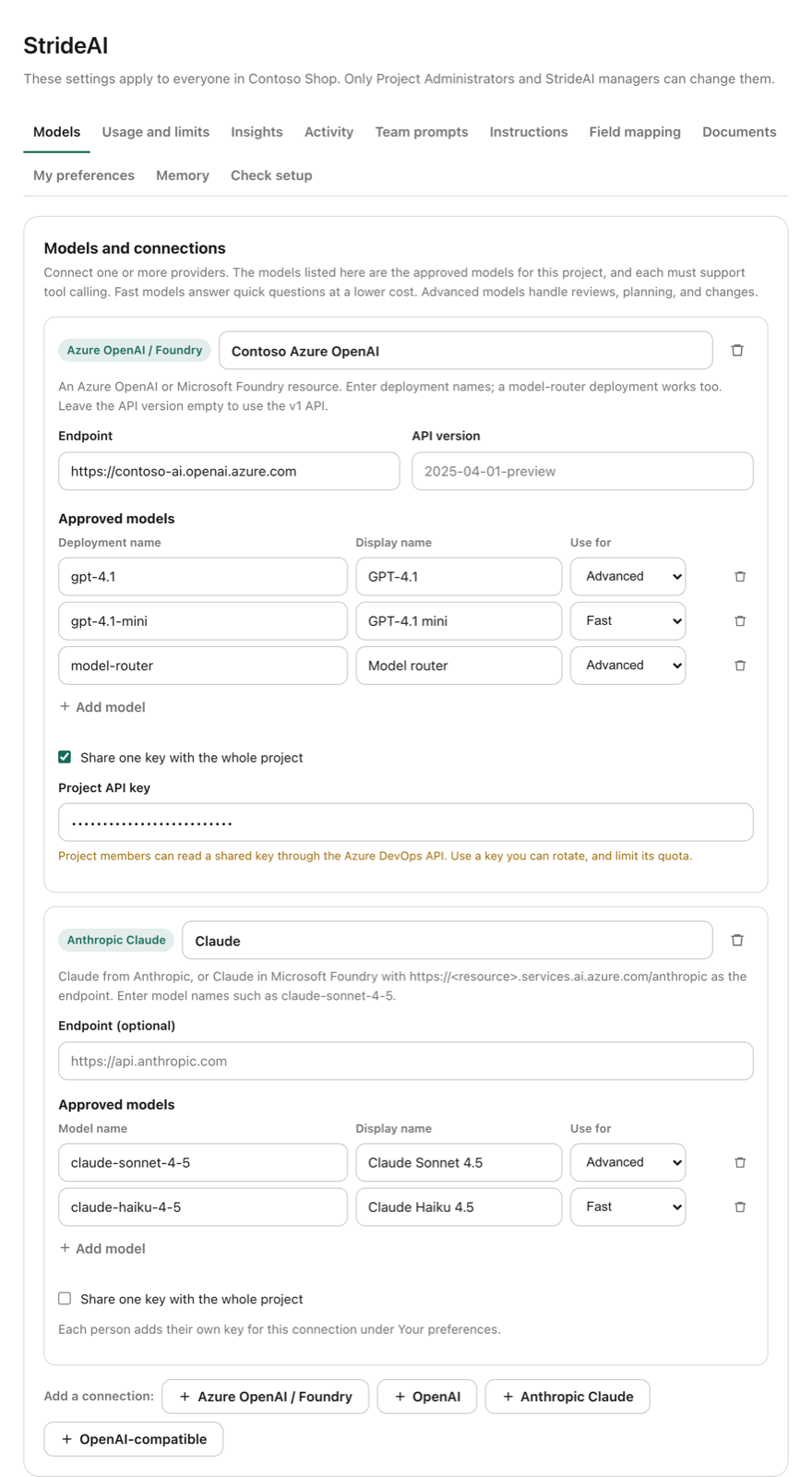
| Azure OpenAI / Microsoft Foundry | Your resource, for example https://contoso.openai.azure.com |
Includes the Foundry model router and Claude in Foundry. Leave the API version empty for the v1 API. |
| OpenAI | Default | |
| Anthropic Claude | Default | Directly, or through Foundry |
| OpenAI-compatible API | Yours | OpenRouter, LiteLLM, vLLM, Ollama, LM Studio, your gateway. Local models → |
| StrideAI Models | Default | Included in Ultimate and Enterprise; nothing to type. StrideAI Models → |
Models must support tool (function) calling. Endpoints must use HTTPS (plain http:// only for localhost and 127.0.0.1) and accept browser requests (CORS).
Fast, Advanced and Auto
Section titled “Fast, Advanced and Auto”Mark each approved model Fast or Advanced. With Auto as the default, StrideAI sends lookups and short questions to a Fast model and reviews, investigations, planning, writing and bulk changes to an Advanced one, without an extra model call. Reasoning models think briefly for lookups and take their full time for the heavy work. Each answer’s Why this answer shows which model answered and why.
When a model fails or is rate-limited, StrideAI falls back to another approved model automatically.
- Shared key per connection: stored in the project property, readable by project members through the Azure DevOps API. Use a key you can rotate and set a quota on it with the provider.
- Personal keys: each person adds their own under My preferences; stored in their private extension data.
- Keys are never sent anywhere but the provider’s endpoint.
Model switching
Section titled “Model switching”Allow people to switch to another approved model from the chat header, or keep everyone on the default. People see their own usage and limits in the header pill.
Lean requests and skills
Section titled “Lean requests and skills”Each request sends only the core tools plus the skills the question needs (pipelines, SAFe, charts…), chosen from the question’s words in five languages and the tools the chat already used. A plain question costs about 4,700 tokens instead of about 18,600.
Prices
Section titled “Prices”Enter the prices from your provider’s price list under Usage and limits to estimate cost and to see how much Auto saved by sending quick questions to a Fast model.